Boxass

Startup Landing Page Template

  • Created: 15/9/2019
  • Last Update: --

Intro

本网站为静态页面,非WordPress主题。

Boxass is a Responsive quick and easy customizable Modern Multipurpose SaaS, Startup & Software Landing Page Template that comes with 12+ valid HTML5 pages and 6+ home page variations. Boxass offers numerous awesome features like , 软件、应用、应用落地页、应用落地页模板、应用展示、应用商店、应用模板、应用官网、简洁应用落地页、创意应用落地页、SaaS推广、Web应用、移动应用及各类营销网站、初创公司发布。 or your just a 资讯. Well commented code, well-documented file structure and 24/7 professional and ultra-fast Support.

To edit this template with your info you will need a code editor, i use Sublime Text (http://www.sublimetext.com/3) and a browser i recommend to use Google Chrome.

It is really easy to use. There is multiple home page layouts to chose, also various selection of pages that you can use to create your website, but you can also create your own page layouts very easily (just copy and paste code form the elements examples).

When you start editing the template with your info is good idea to create separate folder, copy the assets folder and 404.html page there, rename one of the index... files to index.html and then move and edit pages that you will use. Also is good practice to create separate styleseet for your edits and load it bellow Boxass CSS.

Instalation

Follow the steps below to setup your site template:

  1. Unzip the downloaded package and open the /HTML folder to find all the template files. You will need to upload these files to your hosting web server using FTP in order to use it on your website.
  2. Below is the folder structure and needs to be uploaded to your website root directory:
    • HTML/css - Stylesheet files
    • HTML/fonts – Icon font files
    • HTML/img - Image files
    • HTML/js - Javacript files
  3. You should upload all or specific HTML files as per your need.
  4. You're now good to go..! Start adding your content/images and generate your beautiful brand new website for your awesome users.

What's included

Checkout the files that you'll see upon downloading

Once you download the template, you can see a folder with several files and sub folders. You can read description of some important files in continue.

  • 资源文件
    • 样式文件
      • animate.cssAnimation Item CSS
      • bootsnav.cssNabar CSS
      • bootstrap.min.cssBootstrap Min CSS
      • font-awesome.min.cssFontAwesome Icon CSS
      • magnific-popup.cssPopup Window CSS
      • owl.carousel.min.cssOwl Carousel Min CSS
      • owl.theme.default.min.cssOwl Theme Default CSS
      • responsive.cssMain Responsive Media CSS
      • plugins.min.cssMinified version of all required CSS files
    • fonts
    • imgHere is a place to put your media files like logo, images, videos, etc.
    • js
      • bootsnav.jsNavbar JS
      • bootstrap.min.jsBootstrap Min JS
      • equal-height.min.jsSection Height Equalization JS
      • isotope.pkgd.min.jsMixitup Isotop JS
      • jquery.appear.jsAppear JS
      • jquery.easing.min.jsEasing JS
      • jquery.magnific-popup.min.jsPopup Window Helper JS
      • jquery-1.12.4.min.jsJquery Main JS
      • modernizr.custom.13711.jsModernizr JS
      • owl.carousel.min.jsOwl Carousel JS
      • wow.min.jsAnimation WOW JS
      • plugins.min.jsMinified version of all required Javascript files
      • custom.jsTemplate Mian JS
  • index.html
  • index-2.html
  • ...
  • style.css

HTML Structure

Check the structure of HTML files

Boxass follows a simple and easy to customize coding structure. Here is the sample for your reference:


<!DOCTYPE html>
<html lang="en">
  <head>
    <title>Boxass - Startup Landing Page Template</title>

    <!-- ========== Start Stylesheet ========== -->
    <link href="assets/css/bootstrap.min.css" rel="stylesheet">
    <link href="assets/css/font-awesome.min.css" rel="stylesheet">
    <link href="assets/css/magnific-popup.css" rel="stylesheet">
    <link href="assets/css/owl.carousel.min.css" rel="stylesheet">
    <link href="assets/css/owl.theme.default.min.css" rel="stylesheet">
    <link href="assets/css/animate.css" rel="stylesheet">
    <link href="assets/css/bootsnav.css" rel="stylesheet">
    <link href="assets/style.css" rel="stylesheet">
    <link href="assets/css/responsive.css" rel="stylesheet">
    <link href="style.css" rel="stylesheet">
  </head>
  

  <body>

    <!-- Start Navigation -->
    <nav class="navbar navbar-default navbar-fixed white no-background bootsnav">

    </nav>
    <!-- End Navigation-->


    <!-- Start Main
    ============================================= --->
    <main>

    </main>
    <!-- END Main Content -->


    <!-- Star Footer
    ============================================= -->
    <footer>

    </footer>
    <!-- End Footer -->


    <!-- jQuery Frameworks
    ============================================= -->
    <script src="assets/js/jquery-1.12.4.min.js"></script>
    <script src="assets/js/bootstrap.min.js"></script>
    <script src="assets/js/equal-height.min.js"></script>
    <script src="assets/js/jquery.appear.js"></script>
    <script src="assets/js/jquery.easing.min.js"></script>
    <script src="assets/js/jquery.magnific-popup.min.js"></script>
    <script src="assets/js/modernizr.custom.13711.js"></script>
    <script src="assets/js/owl.carousel.min.js"></script>
    <script src="assets/js/wow.min.js"></script>
    <script src="assets/js/bootsnav.js"></script>
    <script src="assets/js/custom.js"></script>

  </body>
</html>

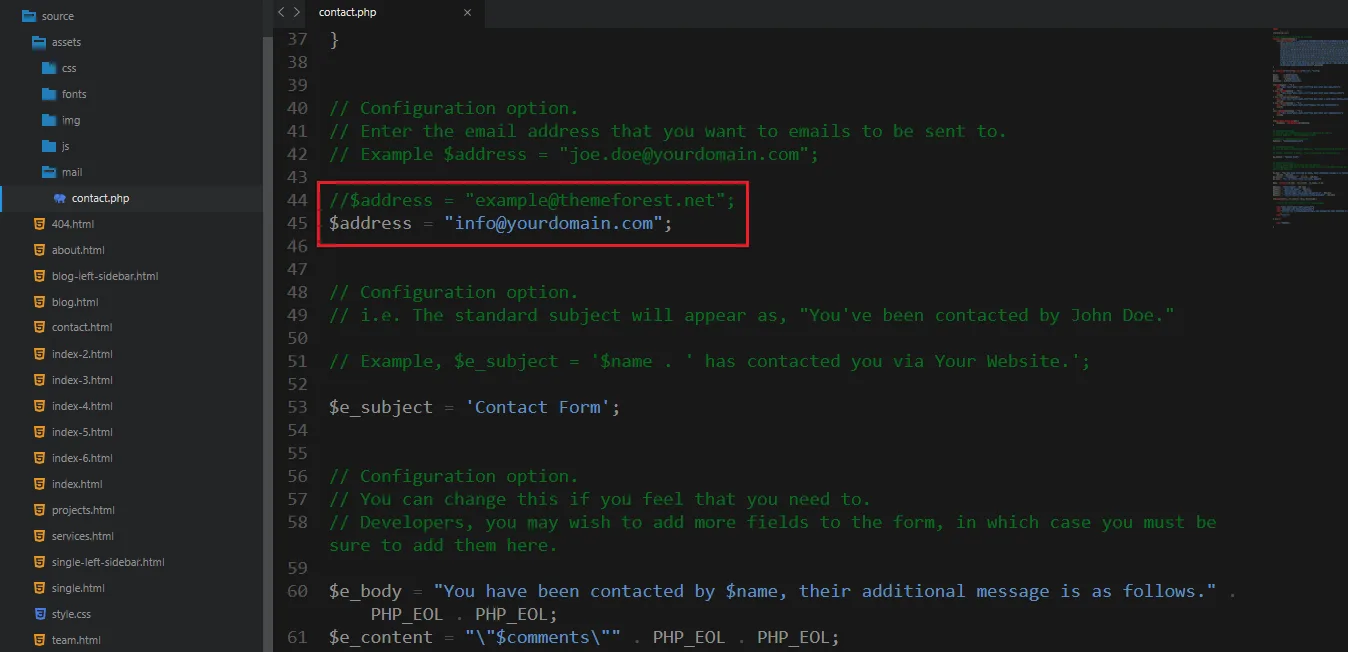
1. Modify your email here to receive emails from contact form:

1. Modify your email here to receive emails from contact for - 雨燕直播

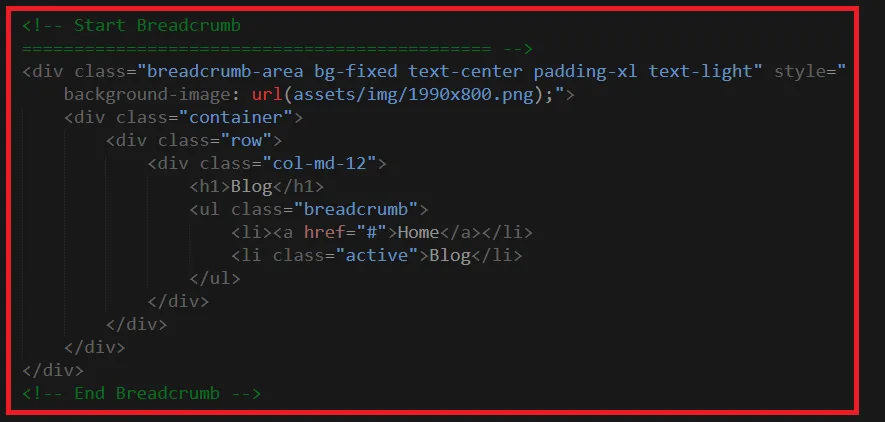
2. The way to move sections from one place to another:

Cut a section like the image below and paste it wherever you need

1. Modify your email here to receive emails from contact for - 雨燕直播

Changing fonts

Boxass uses 2 fonts: Roboto & Poppins from the Google Fonts Library. You can change the fonts by following code

 @import url('https://fonts.googleapis.com/css?family=Roboto&display=swap');
 @import url('https://fonts.googleapis.com/css?family=Poppins:400,500,600,700,800');
                    

attention

Read The following information Carefully

  • Fonts used in this item are loaded from Google. If you don't have an internet connection then item fonts can be different (don't worry about it because this is not an issue)
  • if you think documentation is not enough to customize this item then email to validtheme@gmail.com
  • Before asking for any help you need to make sure that you are the actual buyer for this item. you have two ways to prove that
    1. collect a support ticket and send with your mail
    2. Send a screenshot after login to you account So that we can understand you have access to download this item from themeforest

credits

We would really love to take this opportunity to appreciate guys whose items were helpful to us to make Boxass a really beautiful theme for our awesome users:

Images and video

JS Libraries

  • jQuery
  • HTML5兼容
  • 现代浏览器支持
  • 缓和滚动效果
  • 平滑滚动
  • 元素进入动画
  • 导航菜单
  • 动画特效
  • 数字计数器
  • 图片弹出展示
  • 等高布局
  • 轮播图

CSS & Fonts

  • 前端框架
  • 页面动画
  • 图标库
  • 扁平图标
  • 字体库
京ICP备202477676843号
电话:+86 152 8266 3714邮箱:office@cn-zone-yuyan.com微信:goco_831成都市高新区天府大道193号